
How to Auto-Add New Customers from GoHighLevel to Sweep&Go
Learn how to automatically add new customers from GoHighLevel to Sweep&Go using a GoHighLevel workflow and the Sweep&Go API. This automation eliminates duplicate customer entry and helps keep the marketing and operational sides of your pooper scooper business in sync.
By Poop Scoop Academy
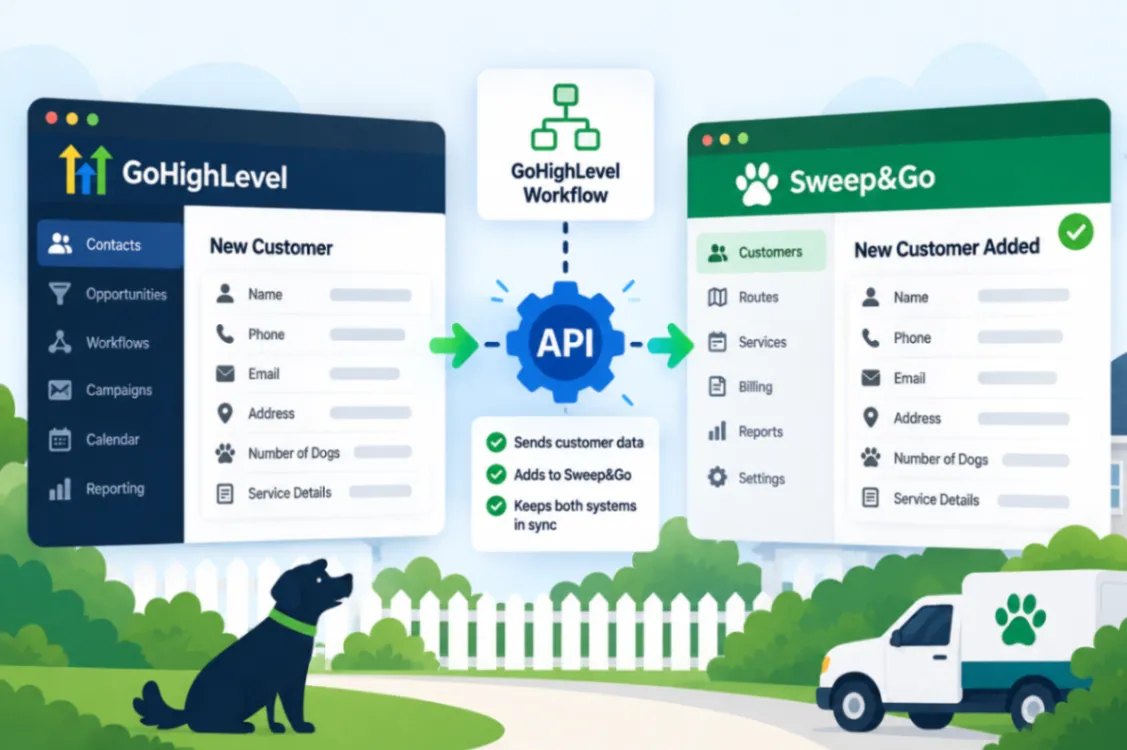
Using different software for marketing and operations makes sense. Entering the same customer into both systems manually doesn’t.
If you use GoHighLevel and Sweep&Go, a customer can exist perfectly inside your marketing system while still needing to be manually created inside the software responsible for helping run your pooper scooper business.
That means double entry, more opportunities for mistakes, and the possibility that someone exists in one system but never makes it into the other.
This tutorial shows how to auto-add new customers from GoHighLevel to Sweep&Go using a GoHighLevel workflow and the Sweep&Go API.
Why Automating GoHighLevel to Sweep&Go Matters
Entering a customer twice might only take a couple of minutes.
The problem is that you aren’t trying to build a business that adds one customer.
You want to add hundreds.
As volume increases, every small repetitive process gets multiplied. Eventually, someone on your team is spending real time moving information between software platforms.
Manual entry also introduces human error.
A phone number gets mistyped. An address is entered incorrectly. Someone gets distracted before finishing the second entry. A customer exists in GoHighLevel but doesn’t make it into Sweep&Go.
For a route-based business, accurate customer information matters. Your operations system plays a role in things such as routing and billing, so missing or incorrect customer records can create problems beyond simple inconvenience.
This automation connects the two systems.
An API, or application programming interface, is simply a way for software systems to exchange information.
In this case, the basic process is:
New customer in GoHighLevel → GoHighLevel workflow → Sweep&Go API → Customer added to Sweep&Go
You enter the information once and let the systems handle the transfer.
What the GoHighLevel to Sweep&Go Video Walks You Through
The source video demonstrates:
- Using Sweep&Go’s API to receive new customer information from another system.
- Creating the GoHighLevel workflow that initiates the process when a new customer needs to be added.
- Connecting GoHighLevel and Sweep&Go rather than maintaining two completely disconnected customer lists.
- Automatically adding the new customer into Sweep&Go so you don’t have to perform the same data entry twice.
- Completing the basic connection in roughly five minutes rather than building an unnecessarily complicated system.
- Testing the sync to confirm the customer actually reaches Sweep&Go correctly before you rely on the automation.
Because the API connection requires specific configuration, use the video for the exact walkthrough.
Is This for You?
This automation is specifically useful if your pooper scooper business uses GoHighLevel and Sweep&Go and you currently have to move new customers between them manually.
The larger your company becomes, the more important connections like this become. Your software should exchange information where possible rather than turning you or an employee into the bridge between every platform.
For the full five-minute setup and testing walkthrough, watch the source tutorial:
Watch How to Auto-Add New Customers from GoHighLevel to Sweep&Go
Don’t Want to Build and Maintain It Yourself?
The DIY approach is great if you enjoy building automations and want complete control over every workflow. But you don’t have to become an automation expert just to keep your pooper scooper business from drowning in repetitive administrative work.
HomeFlow Assistant is another option. It’s built for home-service businesses that want processes such as lead follow-up, reactivation, alerts, and other automations handled without having to create everything from scratch.
When you account for the software and tools needed to build your own automation stack, HomeFlow Assistant can provide a more complete system for about the same overall cost in many cases, while removing much of the work of building and maintaining it yourself.