
How to Get Instant SMS Alerts for New Facebook Leads With Twilio and Zapier
Learn how to get instant SMS alerts for new Facebook leads using Twilio and Zapier. The automation sends an immediate text to your phone whenever someone submits your Facebook Lead Ad, helping you respond quickly even when you're out running a poop scooping route.
By Poop Scoop Academy
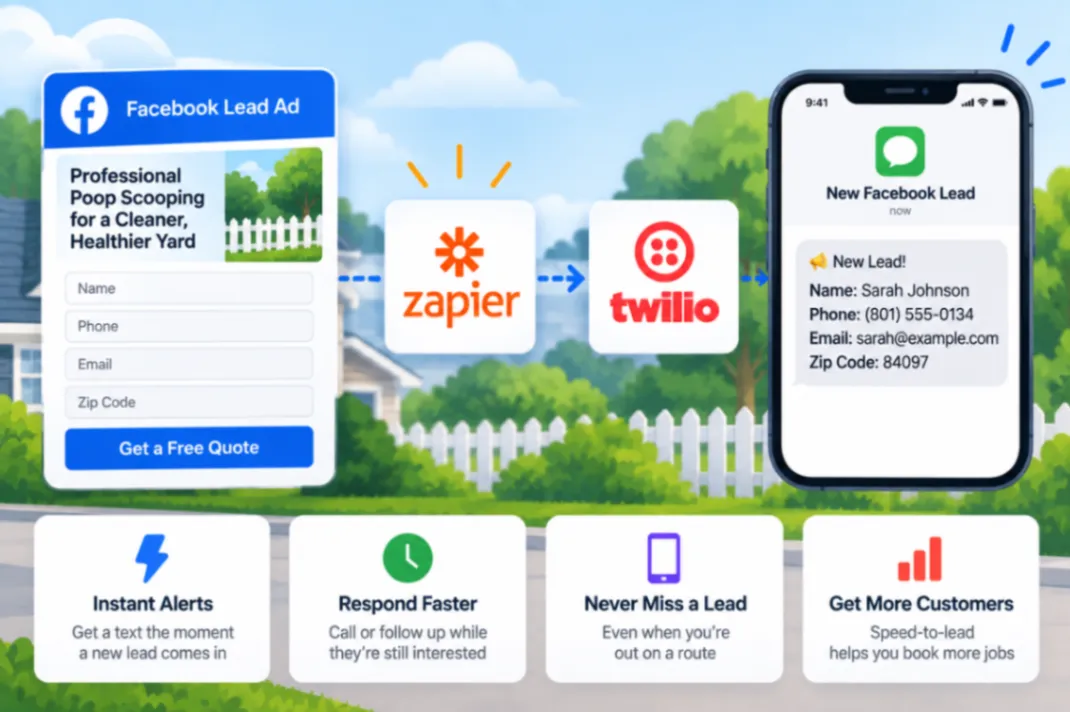
You’re halfway through a poop scooping route when someone responds to your Facebook Ad.
They’ve raised their hand and told you they’re interested.
The problem is that you don’t know they exist yet.
If that lead sits unnoticed while you finish the day’s route, you’ve lost valuable response time. This tutorial shows how to get instant SMS alerts for new Facebook leads using Twilio and Zapier, so every new lead can trigger a text directly to your phone.
Why Instant Facebook Lead Alerts Matter
Pooper scooper businesses have a unique challenge when it comes to handling leads.
You’re probably not sitting at a computer all day.
You’re driving between stops, walking through yards, managing technicians, and actually providing the service.
Your advertising doesn’t stop while you’re working.
Someone can submit a Facebook Lead Ad at any point during the day.
Without a notification system, you’re relying on yourself to remember to check for new leads later.
An instant SMS alert changes that.
The basic pipeline is:
Facebook Lead Ad → Zapier → Twilio → SMS to your phone
Facebook generates the lead.
Zapier recognizes the new lead and starts the automation.
Twilio sends the text message.
Now the lead comes to you rather than waiting for you to find it.
Why Speed-to-Lead Is the Real Value
The text notification itself isn’t particularly important.
What matters is what it allows you to do.
A person who just submitted a lead form is actively thinking about the problem your business solves.
Maybe they’re looking at a yard covered in dog poop.
Maybe they’re finally tired of spending their weekend cleaning it.
Maybe your ad simply made them realize professional pet waste removal was an option.
That’s the moment you want to know about.
If you discover the lead much later, that moment may be gone.
They may have contacted someone else or simply moved on with their day.
An instant alert gives you the opportunity to call or otherwise follow up within minutes, even when you’re out servicing your route.
If you’re paying Facebook to generate leads, knowing when those leads arrive is foundational to the rest of your lead-handling system.
What the Facebook Lead SMS Alert Video Walks You Through
The source tutorial demonstrates:
- Connecting Facebook Lead Ads to Twilio through Zapier so the three systems can work together.
- Using each new Facebook lead as the trigger that starts the automation.
- Having Twilio send an instant SMS alert directly to the owner’s phone when that lead arrives.
- Creating the notification plumbing behind your lead pipeline so you don’t need to repeatedly check Facebook manually.
- Using the alert to know about new opportunities while you’re out servicing routes rather than waiting until you’re back at a computer.
- Building the foundational notification system that can support a larger lead-management process.
The video provides the exact visual walkthrough of how the three systems are connected.
Is This for You?
This is particularly useful for owner-operators and smaller pooper scooper businesses running Facebook Lead Ads while spending much of the workday in the field. The setup uses Facebook Lead Ads, Zapier, and Twilio to put new-lead notifications directly on your phone.
It doesn’t replace a CRM or your sales process.
It solves the first problem: knowing immediately that a new lead exists.
For the complete setup, watch the source tutorial:
Watch How to Get Instant SMS Alerts for New Facebook Leads
Or Skip the DIY Automation Stack
You can build this yourself using Facebook, Zapier, Twilio, and the other tools involved in your lead process. If you like building automations, the video gives you a way to do exactly that.
If you don’t want to spend your time wiring together and maintaining multiple platforms, HomeFlow Assistant gives home-service businesses another option. It’s built to automate things such as lead follow-up, reactivation, alerts, and other repetitive processes without requiring you to build the entire system from scratch.
And once you add up the software required to create a DIY automation stack, HomeFlow Assistant can provide a much more complete solution for about the same overall cost in many cases.