
How to Automate Jobber Text Notifications with OpenPhone and Zapier
Learn how to automate Jobber text notifications through OpenPhone using Zapier. This beginner-friendly connection lets Jobber activity trigger automatic customer SMS notifications, helping pooper scooper businesses communicate proactively without manually sending every routine text.
By Poop Scoop Academy
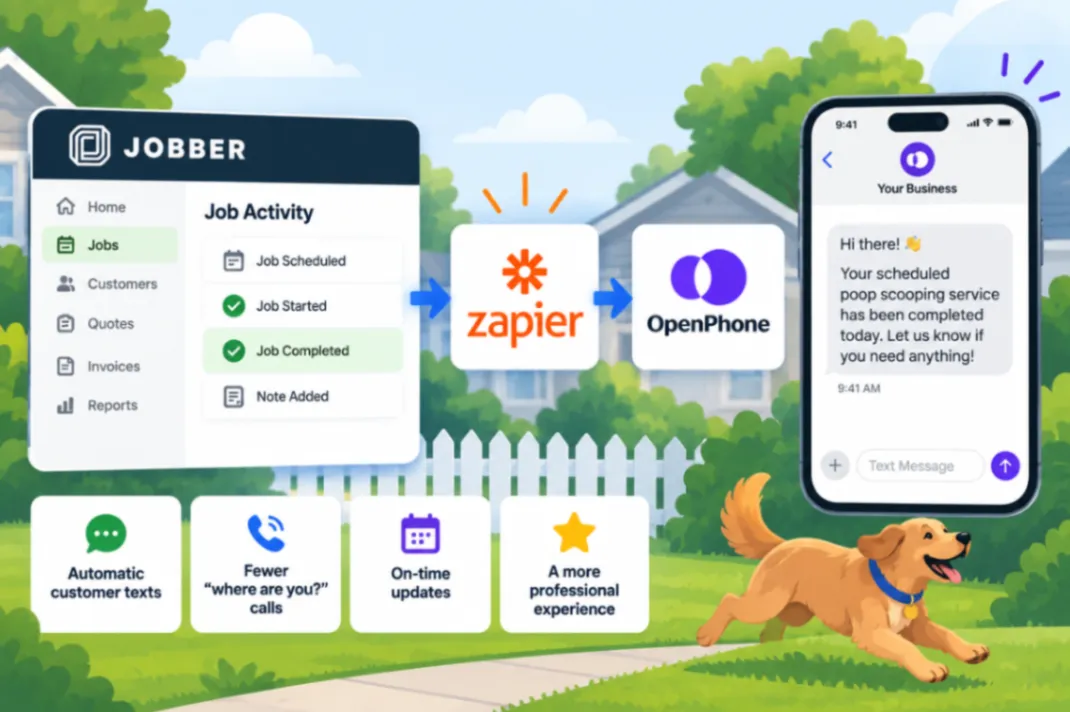
Customers don’t see what’s happening inside your pooper scooper business.
You know what’s happening with today’s route and their job. They don’t.
Without proactive communication, that uncertainty can turn into incoming calls and texts asking what’s going on. Those interruptions may seem small, but multiplied across hundreds of recurring customers they can eat into your day.
This tutorial shows how to automate Jobber text notifications with OpenPhone and Zapier so job activity can automatically trigger customer SMS updates.
Why Automated Jobber Text Notifications Matter
Good customer communication doesn’t necessarily mean more communication.
It means giving customers useful information before they have to ask for it.
That’s especially important for a recurring home-service business. Your customers aren’t buying from you once. You may be visiting their property every week.
If predictable events require predictable communication, manually sending every message creates unnecessary work.
The connection demonstrated in this video uses:
Jobber → Zapier → OpenPhone
Jobber provides the job activity that starts the automation. Zapier connects the two systems. OpenPhone handles the business-phone side of the SMS notification.
Instead of relying on someone to remember to send a routine update every time, the system can handle it consistently.
That can reduce inbound “just checking” calls and texts. It can also reduce no-shows by keeping customers better informed and make a smaller pooper scooper company feel much more organized and professional.
Consistency is another advantage.
A human employee can get busy and forget.
A properly configured automation responds to the same event the same way each time.
What the Jobber, OpenPhone and Zapier Video Walks You Through
The source tutorial demonstrates:
- Connecting Jobber to OpenPhone through Zapier so activity in your job-management software can trigger communication through your business phone system.
- Using job activity as the trigger that starts the automation.
- Sending automatic customer SMS notifications through OpenPhone rather than requiring someone to manually type every routine message.
- Creating a more proactive customer communication system that can reduce the need for customers to contact you for basic updates.
- Understanding how Jobber, Zapier and OpenPhone work together as three parts of one automation.
- Building the connection with a beginner-friendly approach for owners who aren’t automation experts.
The exact setup is much easier to understand when you can see the platforms on screen, so follow the video for the visual walkthrough.
Is This for You?
This is a good fit if your pooper scooper business uses Jobber and OpenPhone and you’re repeatedly sending the same types of routine customer notifications. Zapier provides the connection between them.
It isn’t meant to automate every customer conversation. Situations requiring judgment still deserve a person.
The opportunity is to stop using human time for communication that happens predictably again and again.
For the complete beginner-friendly setup, watch the source video:
Watch How to Automate Jobber Text Notifications with OpenPhone and Zapier
Want the Automation Without Becoming the Automation Guy?
You can build these connections yourself with tools such as Zapier, and the video shows you how.
If you’d rather have a system that handles repetitive communication and other business processes without spending your own time building and maintaining workflows, HomeFlow Assistant is designed for that.
It brings automation for home-service businesses into a more complete system, including lead follow-up, reactivation, alerts, and other repetitive workflows. For about what you may spend assembling the necessary tools yourself, you can have another option that doesn’t require you to personally build every piece.